Your meetings. Your Mac. Your way.
Auldera records your meetings, writes the notes, and answers your questions, all on your device. Then make it do whatever you want.
Thanks. Check your inbox to confirm.
- Nothing joins the call
- No account
- Runs on your device
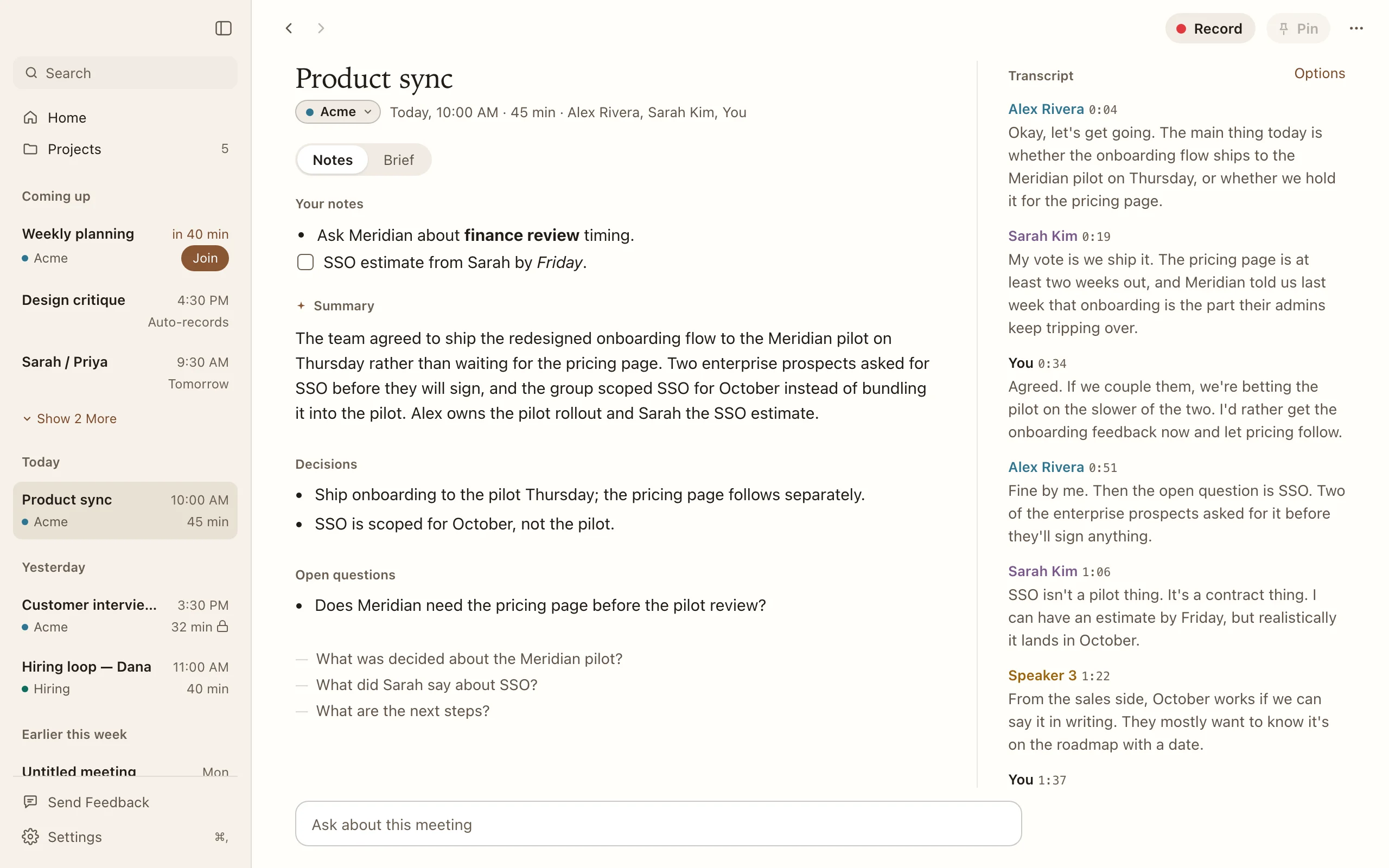
Your meetings.
Recorded, written up, and ready to answer questions.
Notes, written for you
Record calls on Zoom, Google Meet, Microsoft Teams, Slack, FaceTime, or Webex. Nothing joins the call. When it ends, the summary, decisions, and open questions are waiting next to your own notes.
Answers you can check
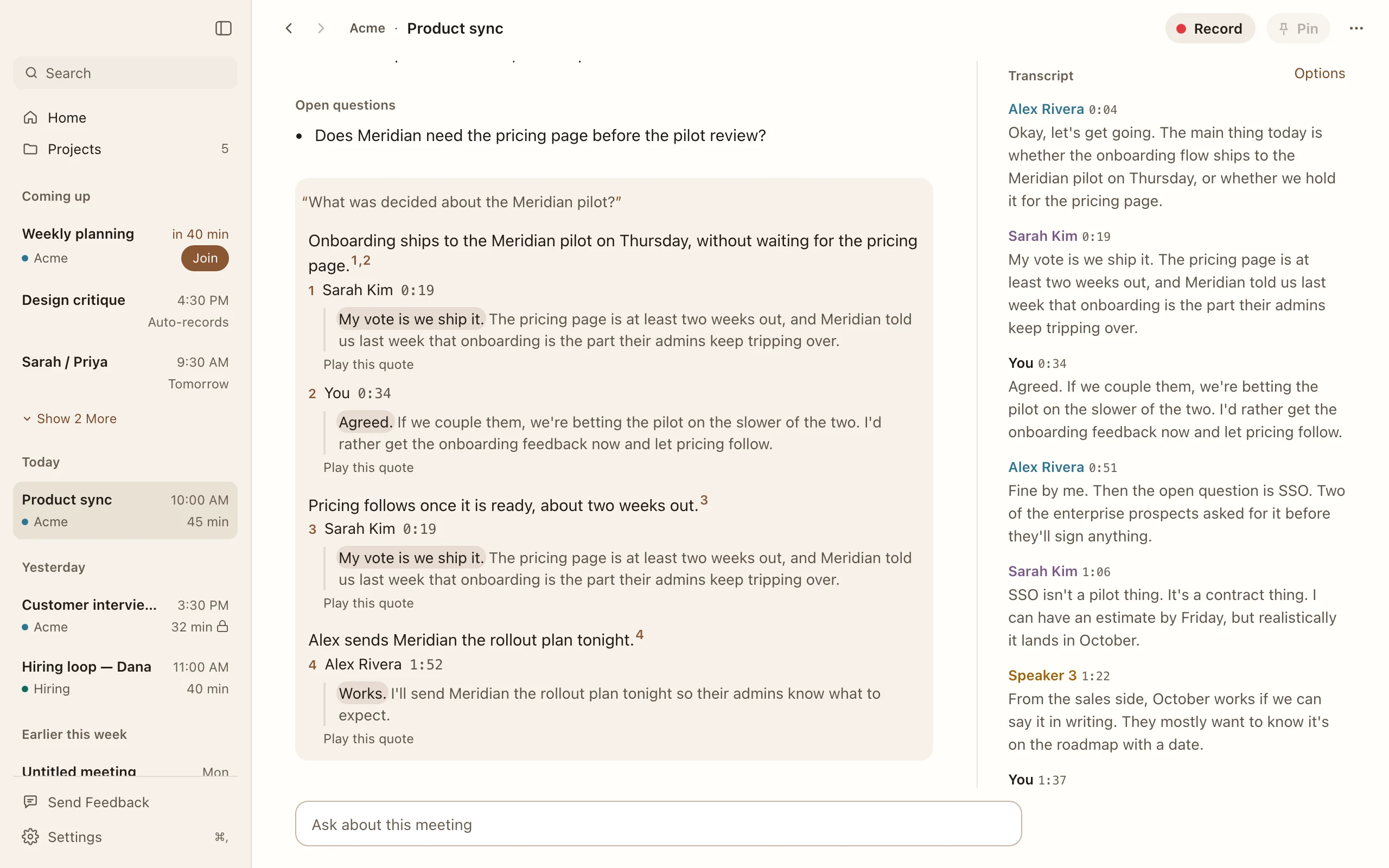
Ask about a meeting or a whole project. Every answer comes with the exact quote behind it, and you can play it back.
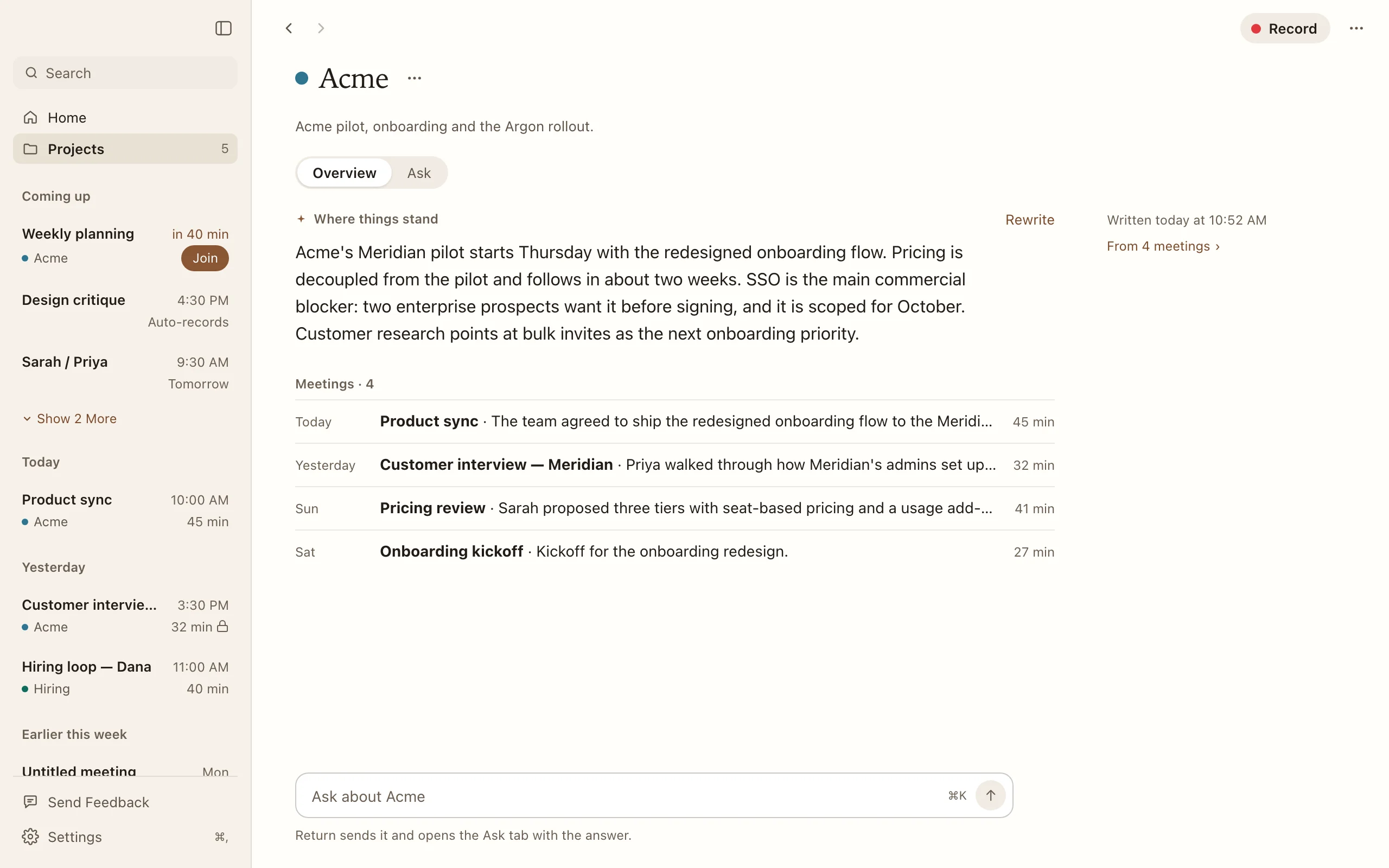
Projects that keep up
Keep the client call with the team review. Each project shows where things stand across every meeting in it.
Your Mac.
Everything happens on your device, and stays there.
Nothing leaves
Transcription, Summary, and Ask run locally. The December build has no Sync or hosted AI options.
No account
Open it and press record. There is nothing to sign up for.
No bot in the call
Auldera listens from your Mac. Nobody sees a stranger join.
Yours to take
Export one meeting or all your meetings as Markdown or JSON. On Mac, import transcript files from other tools.
Your way.
Plugins teach Auldera new tricks. Tell your AI agent what you want, and it builds one for you. In development
Summaries the way you write them
Decisions first. Risks only. A recap your client can read. Write the instructions once.
When the meeting ends
Team review
Decided Onboarding ships Thursday.
Risk The pricing page waits on legal.
Next Alex sends the rollout plan today.
Notes filed where your work lives
Every meeting lands in Google Drive, a shared folder, or your notes app the moment it ends.
When the meeting ends
Google Drive
Clients › Meridian › Team review, Nov 12
Saved just now
The recap, already in the channel
Post the summary to the right Slack channel. Nobody has to ask what happened.
When the meeting ends
#meridian-pilot
Team review
Onboarding ships Thursday. Single sign-on moves to October. Alex owns the rollout plan.
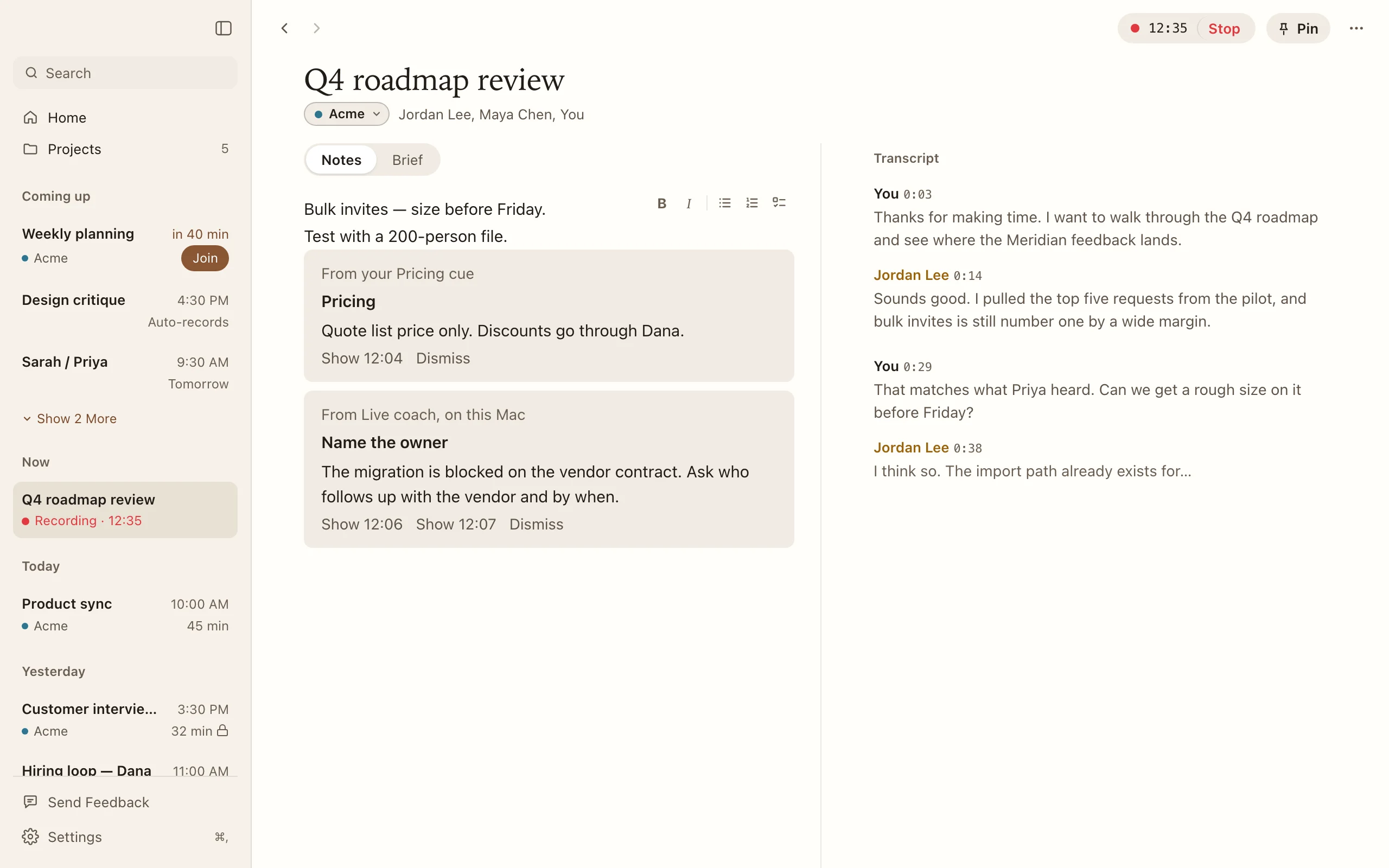
A quiet coach while you talk
A nudge at the right moment: slow down, ask a question, let them finish.
During the meeting
You …and that covers the whole roadmap, so the next thing is…
Coach
You’ve been talking for four minutes
Ask what they think.
Everything about them, right on time
When a client comes up, see your last conversation and what you promised.
During the meeting
Priya Can we go back to what we agreed in September?
Meridian
Last met September 18
You promised a pricing draft by October.
The answer before you look it up
Someone asks about a price, a date, or a ticket. It’s on your screen before you reach for a tab.
During the meeting
Priya What would this cost for fifty seats?
Price list
Fifty seats
Team plan, billed yearly. Quote list price only.
Your CRM, kept up to date
After a sales call, the notes and the next step are already on the deal.
When the meeting ends
HubSpot
Meridian pilot
Note added. Next step: send the rollout plan.
Straight to Claude, or your own agent
Send a meeting on and let it draft the follow-up, update the plan, or brief your team.
When the meeting ends
Claude
Draft follow-up
Hi Priya, thanks for today. Here’s what we agreed and what happens next…
Draft the follow-up email. File tasks in Linear. Translate the recap. Feed your own web service. If you can describe it, you can make it yours.
No coding required
-
Say what you want
Ask Claude or another AI agent for the plugin you have in mind. It writes the whole thing.
-
See what it can do
Before anything runs, Auldera shows you what the plugin can read and where it can send.
-
Turn it on
From then on it works in every meeting, or only in the projects you pick.
Still on your Mac
Plugins can use the AI model already on your Mac, or one you choose. Your meetings stay put unless you send them somewhere.
You stay in charge
Nothing runs until you approve it. If a plugin changes, it asks again.
Private means private
Mark a meeting private and no plugin can see it.
Building one? Give your agent the plugin guide
Before you try it
Which devices can I use?
A Mac with Apple silicon (M1 or later) running macOS 26 or later, or an iPhone running iOS 26 or later. On-device Summary and Ask on iPhone require Apple Intelligence to be available and enabled. A long meeting may exceed what your device’s local model can read; Auldera shows when a summary is unavailable or an answer covers only part of a meeting.
Do I need an account?
No. The December app has no account or sign-in.
What leaves my device?
The December build processes recordings and meeting text on your device. It does not upload meetings for Sync or hosted AI. Model downloads, update checks, and diagnostic reports can use the network. If you choose to send us meeting content for support, review it first. Read the Privacy Policy for details.
Can I use plugins today?
Not yet. Plugins are in development and the current beta does not run them. The plugin guide describes what works so far.
What if I have an earlier test build?
Test builds from before December can use accounts, Sync, OpenRouter, and Auldera Enhanced. Those private test builds also upload meetings, including audio, automatically for diagnostics. The December build turns these off. Read the Privacy Policy for details about earlier builds.
Will people know I’m recording?
Auldera does not add a bot to the call. Let people know before you record and get any consent you need.
How much does it cost?
The December beta is free and invite-only. Recording, transcription, and available on-device Summary and Ask do not require a subscription.
AI meeting notes for Mac and iPhone
Thanks. Check your inbox to confirm.
Google Calendar
Earlier test builds can connect Google Calendar to show your upcoming meetings, match your recordings to what was on your calendar, and help you prepare. The December build uses Apple Calendar on your Mac instead. Auldera reads calendars only and never changes them. Auldera never sells Google user data and transfers no calendar data except as the Privacy Policy describes. Your devices encrypt synced meetings before upload in those earlier builds, and Google encrypts stored bytes at rest. Read the Privacy Policy for the details.